Thursday, 30 August 2012

25 New Features of SharePoint 2010


1. New Claims-Based Authentication Model
SharePoint Foundation 2010 incorporates a new authentication model that works with any corporate identity system, including Active Directory Domain Services, LDAP-based directories, application-specific databases, and user-centric identity models.

2. Sandboxed Solutions
If you remember, in SharePoint 2007 all the solutions (.WSP) runs with full trust which requires farm administrators to pitch in and deploy the solutions. Also the solutions can be deployed at the minimum at a web application level. It means if a solution is deployed in a web application, it will be applicable for all the site collections available in that web application.
In SharePoint 2010, Sandboxed Solutions also called as User Solutions, is a new concept which addresses the above issue by allowing site collection administrators to deploy solutions at the site collection level which is safe to run and not affect the other site collections and web applications running on the same farm. Farm administrators can monitor sandboxed solutions and place restrictions on the resources, such as memory and CPU cycles, they can use. Sandboxed Solutions does not cover full SharePoint object model but it addresses the key scenarios like custom web parts and event receivers.
The solution deployment as in SharePoint 2007 is still exists in SharePoint 2010 but those solutions are called as Farm solutions.

3. New User Interface including Ribbon
User Interface is changed a lot in SharePoint 2010 and now you will be able to do more with few clicks. There are a lot of changes in the User Interface like, "Site Actions" menu is moved to left side of the page, some new options has been added in the "Site Actions" menu, the overall look and feel of the site is different as compared to SharePoint 2007, asynchronous user interface using AJAX and SilverLight which leads to minimal postbacks and improved performance of the site.
But the biggest change in the User Interface of SharePoint 2010 is the addition of Ribbon UI. Microsoft has earlier introduced the Ribbon UI with Office 2007. Now the same Ribbon UI is available in the SharePoint 2010 which brings the SharePoint user experience much more aligned with other office applications. You can see the Ribbon in the top area of any page in the SharePoint 2010 website, see the below screenshot.
SharePoint 2010
SharePoint 2010 - Ribbon

Ribbon provides users access to various operations they can choose from. The Ribbon changes automatically for edit mode and view mode of a page. Ribbon also changes depending on what you are looking, like if you open a document library it displays document library related operations together with other common operations.

4. Built-in SilverLight Support
SharePoint 2010 allows adding SilverLight components without any additional configuration. First you will need to upload your SilverLight XAP file into a document library, then add SharePoint's OOTB SilverLight web part on a page and point it to the respective XAP file uploaded in the document library, that's it; SilverLight XAP component will be successfully added and displayed in the page.

5. Access Services
Use Access Services in Microsoft SharePoint Server 2010 to edit, update, and create linked Microsoft Access 2010 databases that can be viewed and manipulated by using an Internet browser, the Access client, or a linked HTML page.
6. SharePoint Workspace
Microsoft Office Groove has been renamed to SharePoint Workspace in SharePoint 2010. SharePoint Workspace provides local and offline read-write access to SharePoint lists and libraries and also incorporates offline-online synchronizations. SharePoint Workspace is not only got new name but also a lot of new functions and better design.

7.  Managed Metadata
Managed metadata is a hierarchical collection of centrally managed terms that you can define, and then use as attributes for items in SharePoint Server 2010. The Managed Metadata Service supports the use of managed metadata, as well as the sharing of content types across the enterprise.

8. Stsadm command-line tool is superseded by Windows PowerShell 2.0
In SharePoint 2010, the Stsadm command-line tool has been deprecated and it will be superseded by Windows PowerShell 2.0. SharePoint 2010 will still support the Stsadm command-line tool for backward compatibility with previous product versions. But it is recommended to use Windows PowerShell 2.0 when performing command-line administrative tasks.

9. Redesigned Central Administration web site
Central Administration web site has been redesigned in SharePoint Server 2010 to provide a better user experince and make it easier for administrators to find what they are looking for. The home page for Central Administration groups major functional areas (for example - Application Management, Monitoring, Security, and so on) together and lists many of the most commonly used tasks under each area. The Central Administration web site is also eqquiped with Ribbon UI which makes it easier for administrators to view or change details by making common configuration options a single click away.

10. Shared Service Provider (SSP) is no more exists
In SharePoint 2010, Shared Service Providers (SSP's) are no more available. SSP's have been replaced by Service Applications in SharePoint 2010. Earlier in SharePoint 2007, all services were combined into a SSP. Now is SharePoint 2010, all services are running as independent Service Application. You can select and configure from available services to run on an application server. You can also select and configure only required services for a particular web application.

11. New Hardware and Software requirements
SharePoint 2010 will ship only as a 64-bit product. So if you are planning to upgrade SharePoint 2007 into SharePoint 2010 and if you have deployed your SharePoint 2007 site into 32-bit environment then it's definitely a consideration to do the upgradation.
In addition to new hardware requirements, SharePoint 2010 will require an x64 edition of either Windows Server 2008 or Server 2008 R2. It also requires a 64-bit version of Microsoft SQL Server 2008 or SQL Server 2005.

12. Business Connectivity Services (BCS)
Business Connectivity Services (BCS) provides read/write access to external data from line-of-business (LOB) systems, web services, databases, and other external systems within Microsoft SharePoint 2010. If you have worked on SharePoint 2007 (MOSS 2007), you must be aware of Business Data Catalog (BDC). In SharePoint 2010, Business Data Catalog has been replaced by Business Connectivity Services.
Business Connectivity Services supports all the features provided by Business Data Catalog together with a lot of new features and capabilities. Following are some of the new features of Business Connectivity Services:
·         Using BCS, you can read and write back to external systems from SharePoint 2010 site. Using BDC in SharePoint 2007 site, you were able to read data from external system but it didn't support to write back to external system.
·         BCS supports cache-based and offline work features. Now users can manipulate external data when they are working offline and all the read/write operations performed against cached external data are synchronized when connection to the server becomes available.
·         BCS supports reading binary large object (BLOB) data from the external system.
·         Enhanced object model and APIs which enables developers to write generic applications to work against any external system.
·         BCS provides batch and bulk operation support. So now it is possible to read multiple items in a single call which reduces the round trips to the external systems significantly.
·         External data can be converted to a list like view very easily using External Lists.

13. Visio Services
SharePoint 2010 is equipped with Visio Services which allow you to share data linked diagrams in real time. Using Visio Services you can connect to backend, visualize the data and publish the Visio diagram into your SharePoint site. Visio data diagrams can be rendered without the need for Visio on the client computer.

14. New and enhanced SharePoint Designer 2010
To work with SharePoint 2010, Microsoft has also introduced a new version of SharePoint Designer called as "SharePoint Designer 2010". Following are some of the new features and capabilities introduced in SharePoint Designer 2010:
·         Improved User Interface together with Ribbon which improves its usability and make it consistent with the UI of SharePoint 2010 and other office applications.
·         Quick Launch Navigator and Site Content Structure for Site information
·         Using Site Content Structure, you can create a: Web Part page, Master Page, list, and workflow
·         Permissions can be set for individual users
·         Saving and deleting site templates is now possible
·         Ability to use XSLT List View Web Parts to show dynamic views of your data
·         Support for attaching workflows to content types
·         Support for workflow templates
·         Create Content Types and attach to lists
·         New concept of "Entities" which provides seamless integration with back-end systems

15. PerformancePoint Services
PerformancePoint Services in Microsoft SharePoint Server 2010 provides flexible, easy-to-use tools for building dashboards, scorecards, and key performance indicators (KPIs).

16. Usage Reporting and Logging
SharePoint 2010 includes a new database designed to support usage reporting and logging. The name of the database it creates is "WSS_Logging". SharePoint 2010 keeps tracks of everything it does by logging into the WSS_Logging Database. If you remember in SharePoint 2007, Microsoft has recommended to not access any SharePoint database directly. But in SharePoint 2010, the logging database is the only database that Microsoft will be happy to let the developers directly read, query and build custom reports against it.

17. Developer Dashboard
Developer dashboard is a new feature introduced in SharePoint 2010 which displays the performance and tracing information in the bottom of every page. Developers can use this information to debug and troubleshoot issues with page rendering time.  By default this feature is disabled, but we can enable this feature in the development environments to get this additional information.

18. New SharePoint Developer Tools in Visual Studio 2010
Microsoft has introduced a new set of tools within the Visual Studio 2010 which make developing SharePoint applications as easy as any other .net applications. The new tools include project templates for many of the SharePoint application types, such as Web Parts, List definitions, Modules, Application Pages, Workflows, user Controls and others. A great feature in Visual Studio 2010 is the Visual Web part Designer. Now you don't need to build tables for layout, you can just drag and drop and create controls within web parts, similar to ASP.Net forms and user controls.

19. Client Object Model
The Client Object Model (OM) is a new programming interface for SharePoint 2010 where code runs on a user’s client machine against a local object model and interacts with data on the SharePoint Server. Client OM methods can be called from JavaScript, .NET code or Silverlight code and makes building rich client applications for SharePoint easy.

20. Language Integrated Query (LINQ) for SharePoint
Now in SharePoint 2010, you can use Language Integrated Query (LINQ) objects to query SharePoint lists. Earlier in SharePoint 2007 (MOSS 2007), using CAML queries was the only way to query SharePoint lists.

21. Improved Enterprise Search
SharePoint 2010 offers several new ways to customize and extend enterprise search capabilities. SharePoint 2010 provides following two main enterprise search options:
·         SharePoint Server 2010 Search – the out-of-the-box SharePoint search for enterprise deployments included by default with SharePoint 2010.
·         FAST Search Server 2010 for SharePoint – a brand new add-on product based on the FAST search technology that combines the best of FAST’s high-end search capabilities with the best of SharePoint.
Following are some of the new and enhanced capabilities introduced in the Enterprise Search area:
·         New Custom Ranking Models allow you to change the weights that are used by SharePoint Search to rank results. Custom Ranking Models are used in conjunction with the Core Results web part.
·         You can scale out the number of crawl/indexer components by adding additional servers to the farm and configuring them as crawlers which enables to increase crawl frequency, volume, and performance by distributing the crawl load among several servers, along with providing indexer redundancy if a server fails.
·         SharePoint 2010 has capability to integrate FAST Search Server 2010 seamlessly.
·         SharePoint 2010 supports wildcard search.
·         Suggestions while typing search queries
·         Improved "did you mean" suggestions togethor with suggestions for related searches.
·         Faceted search is another new feature in SharePoint Search 2010. When a search query returns a lot of results the faceted search functionality displays a refinement panel on the left side which can be used to refine the results based on criteria like Result type, Site, Author, Modified Date, Tags, etc.
·         Phonetic name matching and nickname matching - Users can search for a person by name without knowing the exact spelling of the name. For example, the search query "John Steal" could yield "John Steele" in the search results; results for the search query "Jeff" include names that contain "Geoff." In addition, nickname matching makes it possible for a search query for "Bill" to yield results that include "William."

22. Social Computing
As you know the previous version of SharePoint (MOSS 2007) lacked on some of the main social features and developers needed to develop their own components to implement social features on top of SharePoint 2007. But now Microsoft has filled that gap in SharePoint 2010.
Following are some of the main social features introduced in SharePoint 2010:
·         Tags, Notes, and "I Like It" - Now in SharePoint 2010, a user can add tags and notes with any page which can be either public or private. A user can also mark a page if he/she liked that page. SharePoint 2010 adds two icons "I Like It" and "Tags & Notes" in all the pages to provide this functionality.
·         Ratings - SharePoint 2010 allows users to rate items within SharePoint site, such as ratings various items within Document libraries, custom lists, blog posts, discussions threads, etc.
·         Tag Cloud - SharePoint 2010 includes an out-of-the-box tag cloud which can be added to any page within the SharePoint site.
·         Newsfeed - Newsfeed is another features included in the SharePoint 2010. You can set the types of updates you want to get in your newsfeed. You can set this using the out-of-the-box settings section available within the user profile page.

23. Rich and Improved Theming Support
SharePoint 2010 provides built-in office-style themes just like in Word and PowerPoint. You can choose and apply a theme to change the look and feel of the web site as per the selected theme. You can also preview a theme on the web site before applying it. You can also imports themes from Microsoft PowerPoint. You can also create custom themes for SharePoint 2010 websites.

24. SharePoint Health Analyzer
SharePoint Health Analyzer is a feature included in the SharePoint 2010 that allows administrators to schedule regular, automatic checks for potential configuration, performance, and usage problems in the server farm. Any errors that SharePoint Health Analyzer finds are identified in status reports that are made available to farm administrators in Central Administration. Status reports that are produced by SharePoint Health Analyzer explain each issue, list the servers where the problem exists, and outline the steps that an administrator can take to treat the problem. In some cases, errors are repaired automatically as soon as they are found, and it also informs farm administrators about the repairs done.

25. Multi-Tenant Hosting
SharePoint 2010 has capabilities for Multi-Tenant Hosting which allows to setup hosting on site collection level. Now you can host customer1 (tenant 1) on a site collection and customer2 (tenant 2) on another site collection within same web application. Each tenant will only have administrator access to his/her site collection. Also, service applications will keep each tenants data separate from another tenants.  For example, one shared search service application will service tenant1/site collection 1's data and tenant2/site collection 2's data while keeping them separate from each other.

Thursday, 23 August 2012

How to Hide Site Actions and View All Site Content For Certain User

Hiding Site Actions:
Open your master page in any editor like Visual studio (recommended) or notepad.
Find “SharePoint:SiteActions”.
Now add SharePoint:SPSecurityTrimmedControl control just before the SharePoint:SiteActions control
Check the screen shot.


Here is the text to add
<SharePoint:SPSecurityTrimmedControl ID="SPSecurityTrimmedControl2" runat="server" PermissionsString="ManageSubwebs">

<<SharePoint:SiteActions control>>

</SharePoint:SPSecurityTrimmedControl>

Now here is the description what we had done.

SPSecurityTrimmedControl as the name suggest, the control check the SharePoint permission and if user is permitted (if the user have permission) then it will access the content inside this control.
And if the user don’t have a permission then the content inside this control will not been accessed.

PermissionsString attribute define which set of permission can access the control.


Hiding View All Site Content:

Find “~site/_layouts/viewlsts.aspx” in the master page.

You will find Sharepoint:SPSecurityTrimmedControl is already there but the
PermissionsString attribute is set as “ViewFormPages”.

Which means that if a person have view rights in the form pages then that person can see this link.

Hiding Ribbon Control:


Wednesday, 22 August 2012

Difference B/W Sequential Workflow and State Machine Workflow


Sequential Workflow:

  • A sequential workflow execute sequentially one after another and always progresses forward and never goes back to a previous step.
  • It represents a workflow as a procession of steps that execute in order until the last activity completed.
  • The control of the workflow is decided by the the workflow itself.


State Machine Workflow:

  • A state machine workflow moves from one state to another until the logic concludes the workflow has completed and there is no  particular order in execution of each state.
  • The control of the workflow is decided by the user.

Friday, 27 July 2012


SharePoint 2010 PerformancePoint Services
·         Performance Management - PM is a category of applications methodologies and infrastructure fir defining, monitoring and improving Business Results.
·         PM application includes Dashboards,Scorecards,Visualization tool,tools to budget,plan and Forecast
·         PM delivered as SharePoint 2010 service applications.
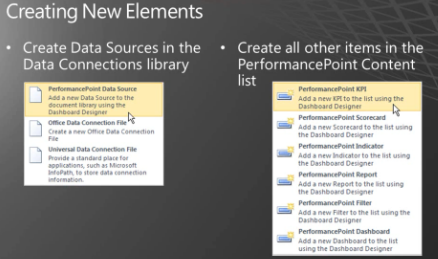
·         PPS Elements

·         All items used by PPS dashboard must be cataloged in SharePoint List.
·         After that dashboards are deployed to SharePoint Library.
·         To reduce creating the above items individually, there is a SharePoint  template named “Business Intelligence Center” site template which incudes,
1.       Data Connection Library.
2.       Performance point Content list
3.       Dashboard Library.

·         To edit elements in Dashboard, you need Dashboard Designer.
Developing Data Sources
·         Data Source Elements.
·         Data Source Configuration.


·         Data Source Elements.
Analysis Services – Connects to the Multi-Dimensional Data source such as cube.
Remaining four data sources are categorized as Tabular as they defined by columns and                rows.
·         Data Source Configuration.
Configure Connection, Authentication and Caching settings.

Thursday, 26 July 2012


Top 10 SharePoint Server 2010 features


  • Access Services & Visio Services
  • Building on the successful Excel Services pattern, SPS 2010 allows users to publish Access and Visio applications to SharePoint which other users can access through their browsers. As can be expected, Access and Visio Services will be somewhat limited in functionality(when compared to their respective desktop versions), but on the flip side, the customers would benefit from the server-side capabilities such as scalability, one centralized version of the document (rendered in a browser friendly format), access to multiple users and security control. 
    Access Services will allow customers to publish their Access 2010 applications to SharePoint. For example, consider a departmental application such as a travel planner built using Access. Using Access Services it will be possible to bring such an application to Sharepoint, thereby reducing the total cost of ownership through one common user experience, development and deployment strategy.
    Similarly, Visio Services will allow customers to render Visio diagrams within the browser. An application of Visio Services would be a visualization of a SharePoint workflow that is rendered inside a browser as a Visio flowchart. Note that no client-side Visio software would be needed in this scenario.

  • Business Connectivity Services (BCS)
  • In MOSS 2007, Business Data Connector (BDC) was the tool of choice for integrating external data sources  into Sharepoint. BDC was available only to customers who purchased the enterprise version of MOSS 2007. Furthermore, BDC was limited to only reading data from the external data sources. Busincess Connectivity Services (BCS), which replaces the BDC functionality in SPS 2010, goes much further. Not only is BCS going to be available with the free, base version of SPS 2010 (renamed to Windows SharePoint Foundation from Windows SharePoint Services), it now supports updating, deletion and insertion of data into an external data source.  Another key advantage of BCS is that it will enable SharePoint Lists to be created directly based on a database table.

  • Developer Productivity Enhancements
  • First and foremost and unlike previous versions, it will now be possible to conduct SharePoint development on a client OS such as Windows 7. In earlier versions SharePoint development had to be undertaken on a server OS. This inevitably created overhead as the development had to be undertaken in a virtualized environment. Secondly, developer enhancements go beyond the support for client operating systems. Developers can now utilize familiar .NET patterns and practices such as LINQ (Language Integrated Query) to query data from a SharePoint List, XSLT for customizing a SharePoint list and Silverlight for creating richer visualizations. There are also a number of enhancements to the SharePoint programming model that offer greater flexibility in extending the out-of-the-box SharePoint behavior.  For example, SharePoint developers commonly extend the SharePoint behavior using small segments of code commonly referred to as event handlers. A common issue with event handlers in MOSS 2007 is that the event handler is not finished executing before the control is returned back to the user. This can lead to a confusing behavior for the users. SPS 2010 seeks to alleviate this by introducing “After-Synchronous” events which are guaranteed to complete execution before the control is returned to the user.
    Finally, Visual Studio 2010 contains extended capabilities for developers to create rich applications on the SPS 2010 platform. Many improvements have also been made in Visual Studio 2010 to increase developer productivity as well as take advantage of SPS 2010 functionality. These improvements help make it easier for .NET developers to create and deploy SharePoint solutions.

  • SharePoint Designer Enhancements
  • SharePoint Designer is a tool targeted towards business users and designers who have used it to quickly and easily perform actions such as customizing lists, changing layouts and creating simple workflows. The one area of improvement often requested is the ability to package and reuse the changes made using SharePoint Designer.  Fortunately, SharePoint Designer 2010 not only addresses this request, it also comes with major improvements with regard to designing workflows, editing SharePoint pages and setting up BCS ( discussed above). SharePoint administrators also have greater control over how SharePoint Designer 2010 is used within their environment. For instance, administrators can block the ability to perform certain actions such as modifying certain SharePoint pages and restricting access to certain areas with the Sharepoint setup.
    One other key feature provided by SharePoint Designer 2010 is the improved interaction between the business users and the IT department. Since SharePoint Designer 2010 uses the same packing and deployment format (commonly referred to as WSP solution package) as the rest of the SharePoint platform, it is now possible to take the work done by a business user within the SharePoint Designer 2010 and import it within Visual Studio 2010. This will allow the IT department to build upon and extend the work done by the business users. 

  • Business Intelligence Enhancements
  • Business Intelligence is another area with significant improvements. To begin, there are a number of scalability improvements to the desktop version of Excel 2010, including the support for the numbers of rows within a workbook that goes far beyond the 64K limit in the current version. The new version of Excel effectively utilizes enhancements in the OS such as the 64-bit support for access to large memory pools and enhancement in hardware such as the multi-core computers.
    Microsoft has made a strategic decision to leverage Excel as the primary BI analyst tool. As part of the self-service BI initiative, Excel users can import large amounts of data from various data sources and quickly generate pivot tables. Once the data is imported into Excel 2010, using a feature called “Slicers”, users will be able to easily filter the data. In other words, Excel users can extract, transform and load (ETL) data from multiple sources directly into Excel without requiring IT to build a formal data import setup. The pivot table generated from imported data can later be shared with other users by publishing it to SharePoint 2010. Under the covers, the publishing process creates an SQL Server Analysis Services instance that can be monitored by IT, using tools such as usage dashboard and resource quota.
    Excel Services, the server-side Excel functionality provided by SharePoint Server, has seen a number of improvements as well. First off, it directly benefits from the scalability improvements to the underlying calculation engine mentioned earlier. Secondly, it enables additional programmability enhancements. For example it, using a JavScript based program, it will be possible

  • In-Place Records Management
  • Records management relates to the process of marking a document as a record or “laminating” them for legal and compliance reasons. A records repository is a library of such records. SPS 2010 dramatically improves upon the capabilities for managing records by extending where and how the records are managed. Unlike MOSS 2007, SPS 2010 will support multiple records repositories within a single SharePoint installation.. This means that users can route records to multiple record repositories. Records managers can also define routing rules to aid in the classification of records. Records repositories now also support the use of hierarchical structures (commonly referred to as File Plan) for storing records in a manner that matches the customer’s organizational hierarchy.
    SharePoint 2010 also provides the flexibility for defining and applying retention rules. For instance, it is now possible to apply a recurring retention rule that specifies several stages of  record retention. This will be very helpful when a records manager wants to specify a retention rule such as “Maintain this document for three years after project completion then transfer it to the archive for the next five years”.
    In addition to using a records repository, SPS 2010 has the ability to declare records in-place, i.e., allow any document inside a document library to be marked as a record without the need to explicitly move it to a records repository. The new in-place record management capability exemplifies Microsoft’s mantra of “compliance everywhere”

  • Enhancements related to Large List Handling
  • Microsoft has placed a lot of emphasis on performance of lists with large numbers of items in them. This has resulted in the addition of the new SPS 2010 features known as : Query Throttling, Batch Query Support, Remote Blob Storage, and External Lists.
    Query Throttling allows IT administrators to limit -or “throttle” – queries that are executed against large lists from consuming too many resources. For example, SharePoint will now block queries that will return more than 5000 rows by default – and this is of course, a configurable setting.  Rather than iterating over each item, SharePoint also includes the capability to process multiple items in a list simultaneously, as a single batch operation.  If there is content that is more suitable for storage outside SharePoint (for instance large media files), the Remote Blob Storage feature will provide a mechanism to store it on file shares (SANS, NAS, RAID arrays, File Servers).
    Finally, External Lists is another mechanism by which large lists can be incorporated in SharePoint. As stated earlier, database-backed lists that are a part of BCS allow content to be stored in separate data stores – such as SQL Server – outside of the Content Database. The benefit of course is that this feature allows for providing supporting large lists without burdening the SharePoint 2010 content database.

  • Workflow Improvements
  • Workflow is a very useful feature of SharePoint 2007. In addition to the out-of-the box workflows that were included with SharePoint 2007, it is possible to use the SharePoint designer to build declarative (no-code) workflows. For more advanced scenarios, developers created custom workflows in Visual Studio. Two of the main challenges in building workflows with SharePoint 2007 relate to the limitations in SharePoint Designer 2007 and the workflow host that is part of SharePoint 2007. While SharePoint Designer allows business users to develop simple workflows, it requires a direct connection to the site for which the workflow is being developed, thus limiting the ability to reuse the workflow in different locations. Furthermore, there is no easy way to leverage code components developed by IT. The workflow host within SharePoint 2007 comes pre-configured with a set of services such as persistence, eventing and tracing. There is no way to add custom services to the runtime host. For instance, there is no direct way to allow SharePoint-based workflows to interact with events other than the list item events.
    SharePoint 2010 alleviates these challenges by allowing the workflows created using SharePoint Designer to be saved as templates for reuse. SharePoint Designer 2010 has also been enhanced significantly to allow business users to leverage tools such as Visio for workflow modeling and visualization. Another major improvement is the ability to modify out-of-the-box SharePoint workflows (e.g. approval workflow, three-state workflow).
    The workflow host within SharePoint 2010 now provides the extensibility option to inject custom services. It is also now possible to kickoff workflows without explicitly associating it to a list item.
    Finally, and from an overall scalability perspective, it is also going to be possible to designate application server nodes as workflow participants. In other words, unlike SharePoint 2007 where each application server node participated in executing the workflows, there will be a way to throttle the workflow execution to a limited set of machines. This allows isolation of services within the farm so system administrators can better manage resources and troubleshoot issues.

  • Social Networking Capabilities
  • One can debate the impact and applicability of social networking tools such as Facebook in the workplace, but there is no doubt that information workers today are demanding similar capabilities from the tools they use inside the workplace. This is why the SPS 2010 enhancements in this arena are so noteworthy. In SPS 2010, just about every element such as sites, documents, videos, blog posts are taggable. There is out-of-the-box support for navigating the tag clouds and lists. Users will be able to rate artifacts and recommend it to others. Co-workers can keep up with the latest by tracking the activity data available as a new feed. Individual users will be able to setup profiles, write to a common or personal board, indicate their presence/location and be able to take advantage of micro-blogging capabilities.

  • Deployment Advancements
  • Unlike the previous versions, SPS 2010 uses a solution package-based single, consistent scheme for packaging and deploying any customizations. The solution package is a compressed file containing all of the necessary components such as features, web parts, list definitions, assemblies, customized ASPX pages and workflows. Additionally, the previous versions required an extensive amount of manual modification of XML files. In SharePoint 2010, these modifications can be done through point and click configuration with SharePoint Designer 2010.
    SharePoint 2010 also introduces a notion of sandbox solution packages that are designed to improve security and manageability. Sandbox solution packages restrict the scope to which a customization can be applied (For example, restricting the scope for a list customization to site collection). Sandbox solutions are also restricted to a subset of SharePoint programmability options. Finally, administrators can enforce quote limits on resources consumed by sandbox solutions to prevent abuse.
    For a more detail review of the SPS 2010, I encourage you to download the white paper we released recently at http://tinyurl.com/sps2010 ( note – this link takes you directly to the PDF ~1 MB)

Tuesday, 17 July 2012

Difference between List Definition, List Template and List Instance in SharePoint 2010


 List Definition:

A list definition defines a schema for a SharePoint list. It contains information on what views are being used, which columns and content types are being used, and other metadata information.

List Template:

A list template can either be created by end users through the SharePoint user interface using an existing list as a pattern or using an existing list instance. If based on a user-created list it is called a custom list template. A custom list template includes everything that defines the list, including list columns and site columns used by the list, content types used by the list, views defined for the list, and so on.

Tips

A list template may sound like a list definition but they are effectively the same thing, a pattern for a SharePoint list. They differ mainly in how they are created:
- A list templates are created in SharePoint or SharePoint designer.
- A list definitions in Visual Studio.

List Instance:


The ListInstance element specifies default data with which to provision the given list type

This element maps to the Listelement previously located within the Configuration element in Onet.xml.

The following example shows the contents of an XML file in which the ListInstance element is used to specify default data for a list instance.


<?xml version="1.0" encoding="utf-8" ?>
<Elements xmlns="http://schemas.microsoft.com/sharepoint/">
   <ListInstance 
      Id="WssAdminTasks" Title="Administrator Tasks" 
      Description="Create an Administrator Tasks list to track a group of admin work items."
      TemplateType="1200" Url="Lists/AdminTasks">
      <Data>
         <Rows>
            <Row>
               <Field Name="Action">/_admin/globalemailconfig.aspx?Source=/default.aspx, Configure Outgoing E-Mail Settings</Field>
               <Field Name="Description">Specify the SMTP e-mail server to use for alerts and administrator notifications.</Field>
               <Field Name="Title">Outgoing e-mail settings</Field>
               <Field Name="SystemTask">True</Field>
               <Field Name="Priority">01</Field>
               <Field Name="Service">SMTP</Field>
            </Row>
         </Rows>
      </Data>
   </ListInstance>
</Elements>

Wednesday, 25 January 2012

Creating a List Item Using ECMAScript (JavaScript, JScript)


<table width="364" height="83" border="1">
  <tr>
    <td>Enter the Title:</td>
    <td><input type="text" id="titletxt" name="titletxt"> </td>
  </tr>
  <tr>
    <td>Enter the Name:</td>
    <td><input type="text" id="nametxt" name="nametxt"> </td>
  </tr>
  <tr>
    <td colspan="2"><input id="btnGetFieldType" onclick="getFieldType()" type="button" value="Get Field Type" align="middle" /></td>
   
  </tr>
</table>
<script language="ecmascript" type="text/ecmascript">
        var fieldCollection;
        var field;
        var list;
var t=document.getElementById('titletxt');
var n=document.getElementById('nametxt');
        function getFieldType() {
            var clientContext = SP.ClientContext.get_current();
            if (clientContext != undefined && clientContext != null) {
                var oList = clientContext.get_web().get_lists().getByTitle('ecmascript List');
       
    var itemCreateInfo = new SP.ListItemCreationInformation();
    this.oListItem = oList.addItem(itemCreateInfo);
       
    oListItem.set_item('Title',t.value);
    oListItem.set_item('Name',n.value);
       
    oListItem.update();

     clientContext.load(oListItem);
 clientContext.executeQueryAsync(Function.createDelegate(this, this.onQuerySucceeded), Function.createDelegate(this, this.onQueryFailed));
            }
        }
      function onQuerySucceeded() {

    alert('Item created: ' + oListItem.get_id());
}

function onQueryFailed(sender, args) {

    alert('Request failed. ' + args.get_message() + '\n' + args.get_stackTrace());
}</script>